Essentials
Small teams organising their work
₹399per person a month, billed annually
- Home
- Projects: tasks, views, recurring work
- People: records, leave, weekly time
(Strativarius Symphony)

Demonstration workspace with sample data.
The problem
What worked at ten people starts to leak at thirty. The business spends more effort reconstructing what is true, just when it needs to move faster.
Headcount, rates and project budgets live in different files. Each is right to someone, and no one is sure which to trust.
A follow-up agreed on a call sits in someone’s WhatsApp or inbox. When they are away, the promise is away too.
The year’s objectives are set in a meeting and revisited at the next one. In between, the work that should move them goes unmeasured.
Leave, time, salaries and documents are held by whoever manages them. Answering a simple question means asking three people.
Who it is for
For owners and operators who need a reliable view of commitments, without an operations team or an enterprise-software budget to run it.
Owners
Managers
HR
Finance
Sales and marketing
Everyone
How the parts work together
Each part of Symphony owns one kind of fact and hands it to the next. Nothing is copied between tools, so nothing drifts.
01
02
03
04
05
06
Objectives and Key Results
Efficiency
Key results link to the shared tasks and projects that move them, so progress is gathered from the work, not a spreadsheet.
Transparency
Every figure shows how it was measured and how fresh it is. People are never turned into scores.
The decision
Decide what to fund, pause or stop from pace you can trace.
Shared work and capacity
Efficiency
One task record appears in Projects, on Home and in manager views. No parallel lists to keep in step.
Transparency
Managers control completion and review, so ‘done’ means someone checked it.
The decision
See your team’s load before you commit to the next deadline.
HR records, leave and time
Efficiency
Approved leave informs work planning automatically, without anyone forwarding a calendar.
Transparency
Projects sees that someone is away, never why. Sensitive details stay with the people authorised to see them.
The decision
Plan delivery on who is actually available.
Customers and opportunities
Efficiency
A confirmed follow-up becomes the same kind of task as project work, with an owner and a date.
Transparency
Campaign results carry their source and are reviewed before they count.
The decision
Know which customer commitments are at risk, and who holds them.
Books, project costs and payroll records
Efficiency
Orders, bills and invoices post to the ledger through one path, and timesheets feed project cost, so month end is a check rather than a rebuild.
Transparency
Journals cannot be edited or deleted, only reversed, and every posting keeps its audit trail. Forecasts state their formula. Symphony never moves money.
The decision
Know a project’s margin, and what is owed either way, while there is still time to act.
The daily view and the record
Efficiency
Each person starts the day with their next useful action, not a wall of dashboards.
Transparency
Access, approvals and sensitive actions can be reviewed inside the product, not only in server logs.
The decision
Answer ‘who did this, and on what authority?’ in a minute.
Better decisions
Forecasts, balances and progress keep their formula, evidence and freshness. If a number looks wrong, you can see why.
Material changes show what will happen, and ask for confirmation, before anything is saved.
Workforce, project, finance and customer facts each have a named owner, so a report never has to choose between two versions.
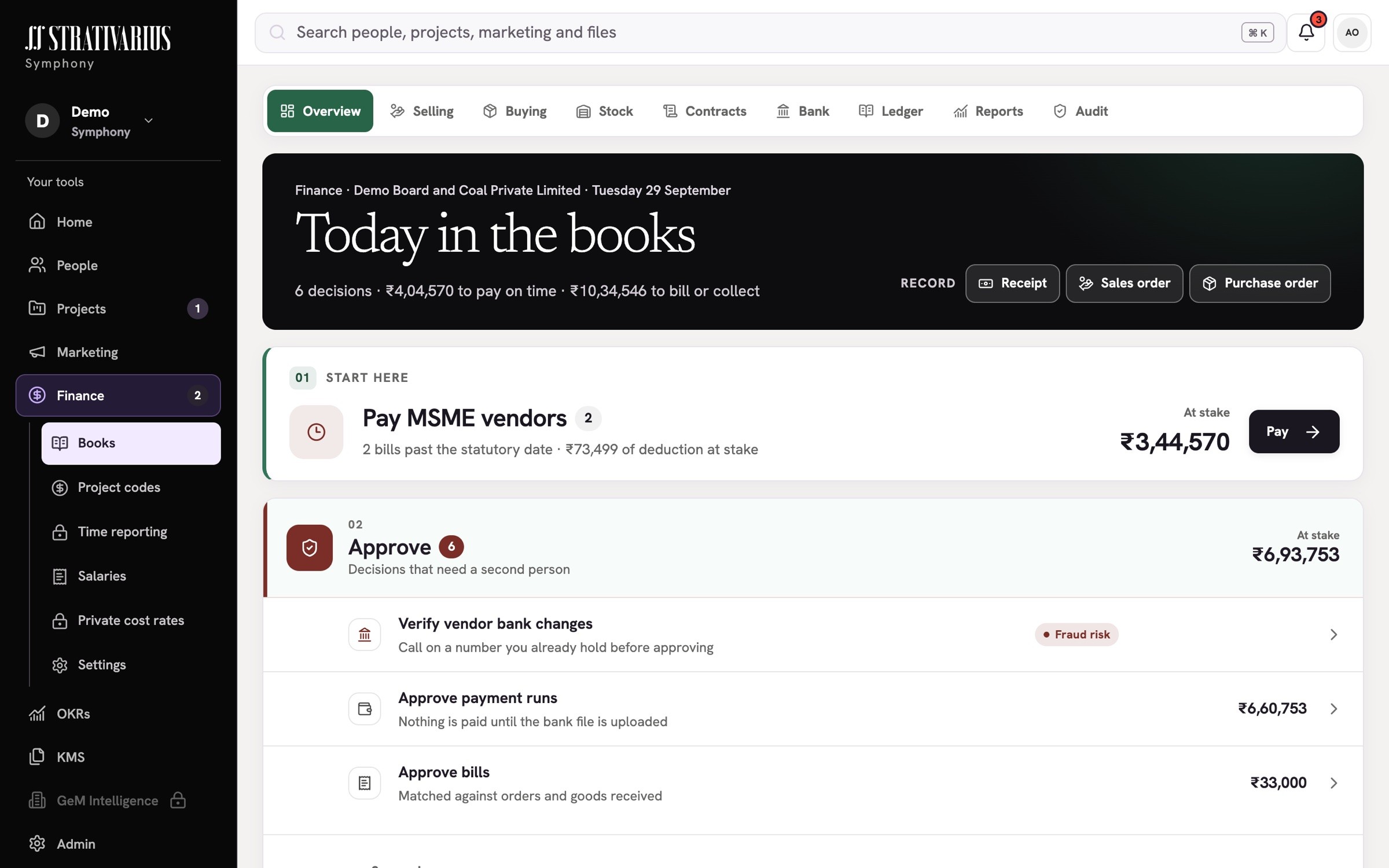
Finance: what is owed either way, and what needs a decision

Projects: progress, and what needs you next
What it’s worth
We will not quote you a saving we have not measured. Here is where the money usually goes, one worked example, and a calculator for your own figures.
Separate tools for customers, projects, HR, goals and accounts, each billed per user.
Managers’ hours spent chasing status and merging spreadsheets instead of running the work.
Follow-ups with no owner, found after the customer has noticed.
Project cost seen at month end, when it can only be explained, not prevented.
Illustrative example — not a customer result
Today: a customer tool for 8 sales users at ₹2,100, a project tool for 40 users at ₹600, an HR tool for 40 users at ₹250 and a goals tool for 10 users at ₹500, each per user per month.
Five managers each spend 3 hours a week reconciling status and spreadsheets, at a loaded cost of ₹800 an hour, over 48 working weeks.
Symphony: Professional plan for all 40 people, billed annually.
Scenario: Symphony removes half of that reconciliation effort. This is an assumption for the example, not a measured result.
Current tools, per year
Symphony Professional (annual billing), per year
Difference in subscriptions
Manager time spent reconciling, per year
Value of time recovered at a 50% reduction
An estimate from your figures. Nothing you enter leaves this page.
How Symphony compares
A differential view, not a feature audit. Where others do more, we say so.
| Capability | Zoho One | Salesforce Starter / Pro | Odoo |
|---|---|---|---|
| OKRs linked to the work that moves themSource 1 · Source 2 · Source 3 | Same | Better | Better |
| Customer follow-ups become shared project tasksSource 1 · Source 2 | Same | Better | Same |
| Approved leave informs work planningSource 1 · Source 2 | Same | Better | Same |
| Connected without configuring app-to-app integrationsSource 1 | Better | Better | Same |
| HR records, leave and weekly timeSource 1 · Source 2 | Same | Better | Same |
| Project budgets, rates and timesheet costingSource 1 · Source 2 | Same | Better | Same |
| Privacy requests, consent and retention, includedSource 1 · Source 2 · Source 3 | Same | Better | Better |
| Accounting: ledger, invoicing, stock and GST working sheetsSource 1 · Source 2 | Same | Better | Same |
| Marketing automation and social publishingSource 1 · Source 2 | Partial | Partial | Partial |
Compared on 28 September 2026 from each vendor’s public product documentation. Products change; tell us if something here is out of date.
Plans
Priced per person, per month. Pay annually and save about 20%.
Small teams organising their work
₹399per person a month, billed annually
Teams that sell and set goals
₹719per person a month, billed annually
Organisations running projects to budget
₹1,039per person a month, billed annually
Organisations with privacy and audit duties
₹1,439per person a month, billed annually
Larger or multi-entity organisations
Custom
Access is by guided walkthrough, so your workspace is set up with you, not left to you.
Questions
You do. Each workspace is separate, and people see only what their role allows.
Yes. We set up your workspace with you during the walkthrough, starting with the records you use most.
Yes. Finance includes double-entry books, invoices, stock, bank reconciliation, statements and GST working sheets. We set up your books with you, and recommend your chartered accountant reviews them before you rely on them. Symphony prepares GST working sheets; it does not file returns.
Those connections are prepared but not yet switched on. We will tell you when each one is live.
Not yet. Every workspace starts with a guided walkthrough, so it fits how your organisation works.